
It's no secret that we've been longtime fans of Plan to Eat, an online meal planning service + grocery list maker. In fact, they've been partners of ours for six years now - clearly they are very well loved! :) We're so excited to announce in today's sponsored post that they've just released a new app (for iOS and Android)! And today you can try Plan to Eat and their new app for free, and also enter to win a $300 prize package. Read on for details!
-
About Plan to Eat
Plan to Eat was started by a family who was fed up with the desire to eat good, real food, but feeling frustrated as the dinner hour approached. Using programming skills, the husband created this organizational platform which has helped tens of thousands of others get real food dinners (and breakfasts and lunches!) on the table easier. Easy to see why we like it!
Who should use Plan to Eat?
- Those who don’t have a solid meal planning system in place.
- Anyone who has recipe magazine clippings or dog-eared pages in cookbooks.
- Those who “pin” recipes and forget to go back to actually make them.
- Anyone who wants to streamline their meals, recipes and food shopping.
The Plan to Eat App
Plan to Eat is an online meal planner & meal planner app that allows you to add and organize recipes (of your choice from a variety of sources, both in print and online) by dragging and dropping those recipes onto a calendar. Their software then automatically creates your shopping list based on your planned recipes. It’s that simple! You see a recipe, save it, plan it and voila; when you are ready to shop, you click “shop” and then “print” your grocery list. How easy is that?!
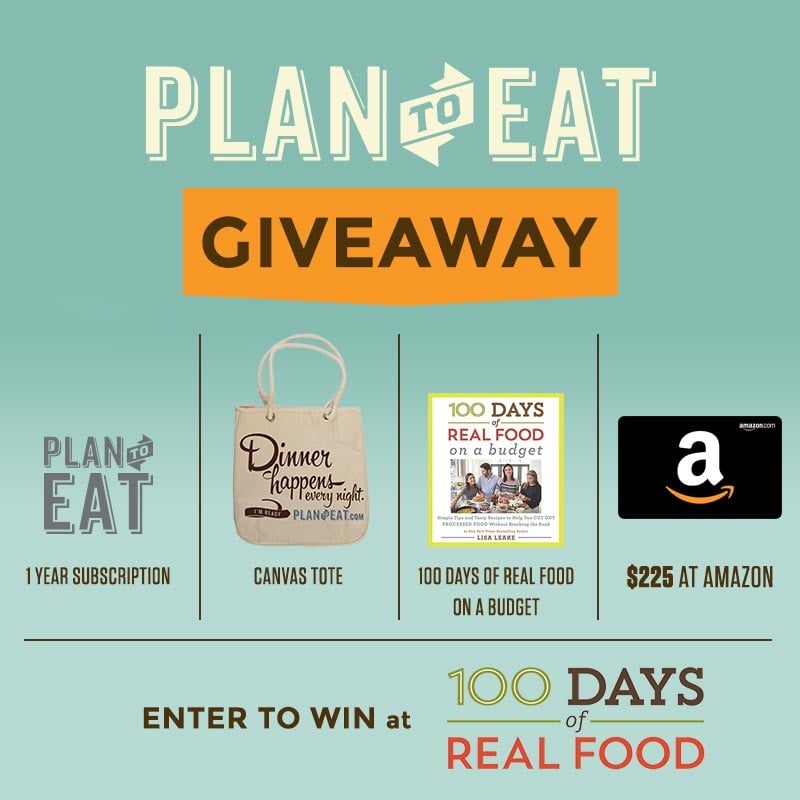
Giveaway Details: $300 in value for TWO winners ($600 total!)
The Plan to Eat giveaway includes the following; we'll choose two winners:
- 1 free year of Plan to Eat ($39)
- 1 Plan to Eat canvas tote bag ($19)
- 1 copy of Lisa’s NEW 100 Days of Real Food: On a Budget book ($17)
- Kitchen stuff from Amazon ($225)
TOTAL: $300 prize package for each winner.
Want to Save this Recipe?
Enter your email below & we'll send it straight to your inbox. Plus you'll get great new recipes from us every week!
How to Enter Giveaway
If you would like to enter the giveaway please read and follow these rules…
- Sign up for a free trial at Plan to Eat. This can be done either through their website or through the app. If you already use Plan to Eat, you can enter using your account.
- Next, add and plan three recipes in your account. This can be done either through the website or through the app. The video on this page will show you how to add recipes from anywhere!
- Come back to this post and enter the giveaway below using your Plan to Eat email or username, and you're entered!
The winners will be selected at random and emailed directly so make sure your email address is entered correctly. Each winner will be contacted by August 2nd and will have three days to respond before they are disqualified and a new winner is chosen. Please note: Your email address will not be shared or used for any other purpose. See entry form for full terms.


Maggie says
Hi, I’m a Plan to Eat app user and can’t figure out how to view 100Days of Real Food in their portal. How do I “friend” 100 Days in the app?
100 Days Admin says
Hi, you should be able to go into the friend's tab and search for our name. If it is not that straight forward, I would reach out to Plan to Eat to see if they can direct you to the right place. - Nicole
Ekenechukwu says
I just signed up with plan to eat and since then it's been an amazing journey getting to plan my meals with less difficulty.
Before I used to have such a hard to making meal plans but with plan to eat,it's a lot easier,faster and less time consuming.
Haelie says
I just signed up for a plan To Eat with the half off holiday special. Can my husband also load the app on his phone and have everything I have synced up?
chrisdig says
How does this relate / compare to 100 days Prepear app?
Shannon says
This is so cool. Thank you soooo, soooo much for the video on how to add recipes. I'm usually tech savvy(ish) but there was a little bit of a learning curve to this app. I'm excited to go back and add more now.
Kat says
This is really exciting! As a first time mom-to-be I've been pretty stressed with trying to plan & organize meals while feeling horribly tired and foggy. I can only imagine how it's going to be with a little mini-me in tow! I'm super excited to try this out and see how it can help me to get nutritious meals on the table more often. I love cooking, I just don't like to plan. Thanks again for this!